Causal Flow
TraceMind's signature view. It turns a watched property change into a walkable story, from the first entry to the write that finally landed.
The roles in a chain
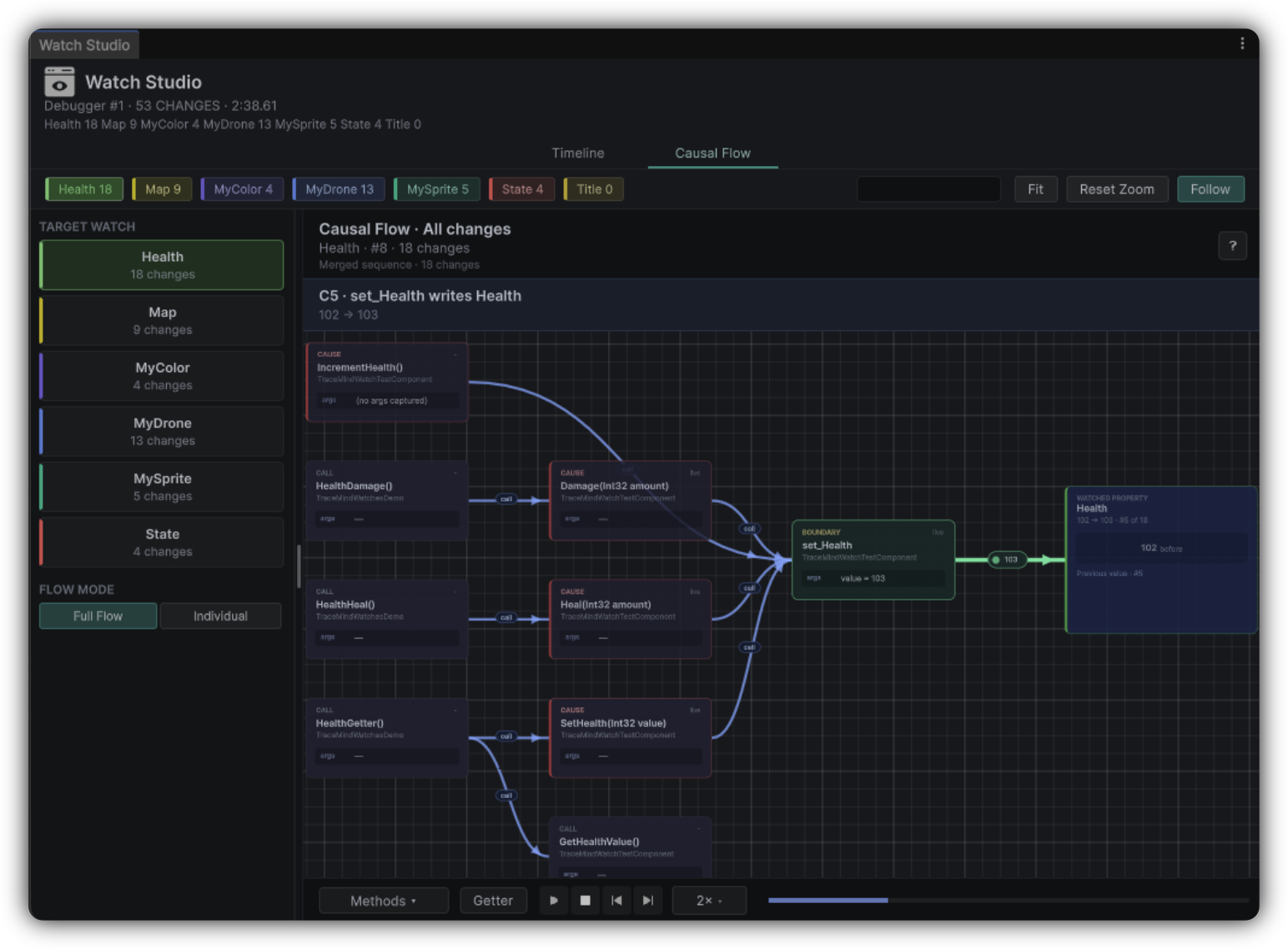
Causal Flow explains how methods led to a watched property write. Playback walks the chain, then commits the property change as the destination of the story. A small set of roles gives teams shared language.
Entry
Where the causal story begins. Start here and identify the initiating context before following anything else.
Call
A method invocation in the chain. Follow these in order without skipping boundaries.
Cause
A step that contributed to the outcome. Pause on any cause node that surprises you, because that is usually where the bug hides.
Getter
A read that fed the write path. Unexpected getters often reveal a dependency you did not know existed.
Boundary
A meaningful crossing in the narrative, such as moving between systems. Boundaries are where responsibility changes hands.
Watched property
The write you are explaining, and the end of the chain. Confirm it matches the bug symptom before drawing conclusions.
How to enter Causal Flow
Open it from Watch Studio for a selected change, or from related Report drill-downs where a watched write is in focus. You get the most value when the Scenario already includes a Watch on the symptom member.
Full Flow vs Individual
| Mode | Use when |
|---|---|
| Full Flow | You want to compare causal paths across every recorded change on the watch |
| Individual | You have identified one suspicious change and want the chain for that write only. Select it in the CHANGE picker |
How to read a chain
Start at the entry
Identify the initiating context.
Follow the calls
Walk the chain without skipping boundaries.
Pause on surprises
Study getter and cause nodes that you did not expect.
Confirm and capture
Check the final watched property matches the symptom, then capture the decisive nodes on MindBoard with Caused By or Supports.
Explainability is the product
If you can narrate the chain out loud, you are ready to fix the bug or ask a precise follow-up question.
Layout tips
Group by class when the graph is dense, drag method cards to tidy edges before reviews, and use playback deliberately instead of jumping randomly. If the chain stays cluttered, improve Scenario Tracking on the next take.
When Causal Flow looks incomplete
| Symptom | Likely next move |
|---|---|
| Missing caller | Track the suspected owner or caller type |
| Shallow property detail | Raise Profile depth or Watch strategy |
| Too many irrelevant nodes | Narrow Tracking and re-record |
| No watched write | Add or enable the Watch first |
Causal Flow quality is mostly Scenario quality.